Lossless and Wireless Data Transfer Even in Harsh Factory Conditions

Smart Counter devices are industrial hardware designed to extract production data from your machines using the power of IoT technology, even under the harshest factory conditions, and securely transfer it to the center via Wi-Fi (wireless) or Ethernet (wired) infrastructure.
Unlike KeyPDTs, they do not feature a user interface (screen) on the device itself; they are configured to operate seamlessly with Industrial PCs on the shop floor. Their greatest hardware strength lies in uninterrupted operation: Smart Counters continue to work and collect data even if the central network connection is lost. The moment the connection is re-established, they automatically transfer the accumulated data to the system without any loss.
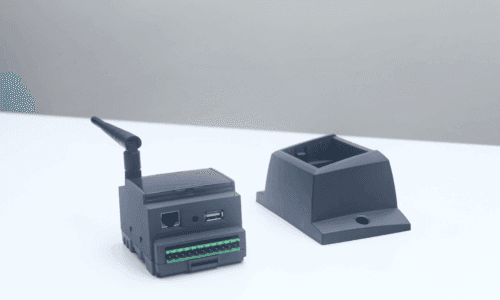
Advantages of gathering data with Smart Counter
Wired or Wireless Flexible Infrastructure:
Devices on the shop floor can connect to the center directly via Ethernet or wirelessly through Wi-Fi, eliminating the need to establish costly and complex RS485 data collection networks.
Lossless and Instant Data Flow:
Critical data such as production quantity, length (meters), and weight are collected in a completely lossless manner by applying various movement combinations and signal filters, and are instantly transferred to the system.
Automated Downtime Tracking:
Machine downtimes are automatically recorded through hardware signals, eliminating the need for operator declarations.
Interaction with Peripherals:
The device’s digital outputs can be activated by various notifications (e.g., limit exceedances). Status information can be shared locally in real-time with other peripherals on the shop floor via actuators connected to these outputs.
Brand-Independent Universal Connectivity:
Thanks to a standardized data collection structure designed independently of the brand, model, and age of the machines in the production area, production data can be collected with the same standard from any type of equipment.
| Offline Functioning | Included. In cases where cables are severed, servers are down, or the network connection is lost, it can hold data within its memory (10,000 records / approx. 1 week of data capacity). It sends the historical data completely once the system is online again. |
| Screen/Indicator | 12 LED indicators (for monitoring instant working status, communication status, and input-output notifications). |
| Operator Interface | Not included. Necessitates Industrial PC usage for data entry. |
| Communication Infrastructure | Ethernet (100 Mbit, magnetic isolation, DHCP or manual IP assignment) or Wi-Fi (802.11 b/g, signal level monitoring, changeable and extendable antenna). |
| Digital Inputs | 4 units (25 kHz operating speed, 12-24 VDC voltage). |
| Digital Outputs | 2 units (transistor outputs, 12-24 VDC voltage). |
| Power Supply & Consumption | 12-36 VDC supply range, 4 W low power consumption. |
| Operating Conditions | Functions flawlessly between 0-60 °C and up to a maximum of 95 percent humidity (non-condensing) |
DIN rail montage
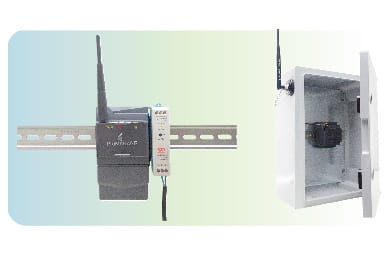
Suitable for standard DIN rail mounting inside panels. If the device is mounted inside a closed metal board and Wi-Fi communication will be used, it is recommended to route the antenna outside the board for optimal signal quality.
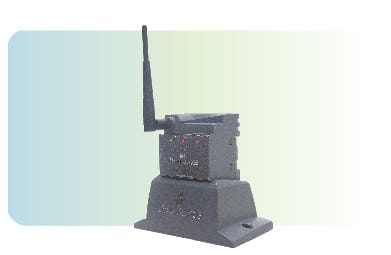
Surface Montage (Dock Station):
A special “Dock Station” accessory is used to mount the device on flat surfaces (e.g., on top of a machine). Cable routing can be concealed by opening a hole on the surface underneath the device. It is critical to position the device at an angle where the warning LEDs are clearly visible from the shop floor.
Installation and Network Instructions
For a seamless deployment process, the following instructions must be followed during installation:
General Installation Guidelines
- Hardware and network configuration must be completed correctly.
- Necessary ports must be allowed in the firewall to ensure the Smart Counter can communicate with the NetPC.
- All installations and electrical connections must be carried out in accordance with the wiring diagram in the user manual.
- Device-machine pairing is performed via MAC address. Therefore, the MAC addresses of all Smart Counter devices installed on-site must be recorded during installation.
1-Ethernet Connection with Dynamic IP (DHCP)
- There must be a sufficient number of available IPs on the network so that the Smart Counter can receive an IP address automatically.
- A “ping” should be sent from the NetPC to the Smart Counter to verify that it has received the correct IP.
- The Ethernet cable between the Smart Counter and the switch should not exceed 90 meters.
- It is recommended to use plastic RJ-45 sockets for physical durability and insulation.
2-Ethernet Connection with Static IP
- IP addresses are loaded manually and individually onto each device. If an error occurs, the process must be repeated.
- After assignment, verify the connection by pinging the device from the NetPC.
- The Ethernet cable should not exceed 90 meters, and plastic RJ-45 sockets are preferred.
3-Wi-Fi (Wireless) Connection
- Since manual IPs cannot be assigned directly to the device in Wi-Fi communication, an IP must be assigned via DHCP and reserved for the device. Verify the connection by pinging from the NetPC.
- The Smart Counter should be positioned near the Access Point. There should be no metal screens, thick walls, or other obstructions between the device and the Access Point.
- If the device is mounted inside an electrical panel (or metal box), its antenna must be routed outside using an external antenna cable.
Discover Digital Solutions
Tailored to Your Industry